
WPS Office v11.* dictionary
Posted: 2021-04-03 Filed under: office | Tags: dictionary, libreoffice, spellcheck, WPS Office 9 CommentsI noticed that an old post of mine about adding dictionaries to WPS Office, has been receiving some attention recently. I quickly checked the links and it seems they are dead, also the file paths listed there no longer apply for WPS Office v11. Therefore, I decided to check how to add dictionaries to version 11.
EDIT (27 May 2023): check this much more recent post of mine, as well as the ready to use dictionaries at GitHub.
I am using WPS Office 11.1.0.9719.XA installed from SBo on Slackware64 -current. First you need to have the dictionaries files. Since the ones from WPS office are no longer available (or I simply cannot find them), I searched a bit and ended up with the dictionaries for LibreOffice found here. I suppose you can download only the ones you need, however, I just downloaded the whole collection and unzipped it.
As in my old post, I want to have British English spellcheck. What I need is found in the en folder, but it has to be prepared for WPS Office as follows:
- Create a folder
en_GB - Copy files
en_GB.affanden_GB.dicto the newly created folder and rename them asmain.affandmain.dic, respectively. - Create a file called
dict.confwithin folderen_GBwith the following contents:
[Dictionary]
DisplayName=English (UK)
DisplayName[en_GB]=English (UK)
Ok, so where does this folder go? The en_GB folder should be placed in either:
- for your user only:
~/.local/share/Kingsoft/office6/dicts/ - system-wide:
/opt/kingsoft/wps-office/office6/dicts/spellcheck/
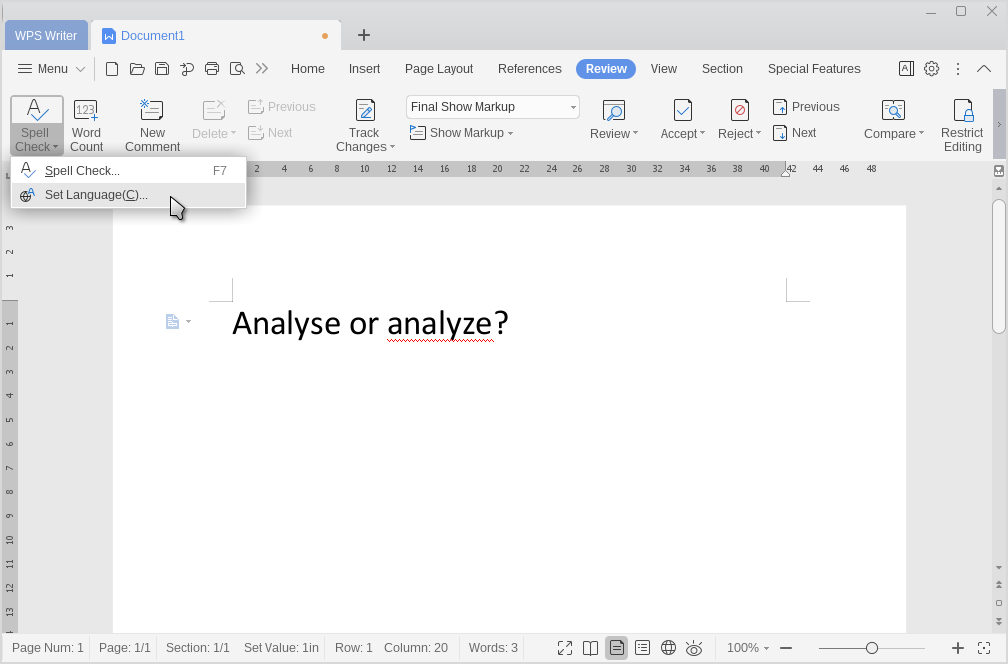
Then just restart WPS Office. To select the dictionary go to:

 Slackalaxy
[…] (03 April 2021): Please, check this newer post for updated howto for WPS Office […]
[…] WPS Office v11.* dictionary → […]
There was an old AUR package called “wps-office-extension-english-uk-dictionary”. Adding to the google trail should anyone want to package it again.
thanks!
do you have a link to this?
https://github.com/HoLuLuLu/wps-office-multilang/tree/master/wps-office-bin/opt/kingsoft/wps-office/office6/dicts/spellcheck
happy new year!
hey, thanks! I’ll give it a try and maybe make a third post dedicated to WPS dictionaries
Happy New Year, too!
Maaaaaaaaaaaaaaaaaaaaaaaaaan you saved my life, i just needed the spanish dictionaire and couldnt find anyother place else, kudos for you. Cheers from méxico
I’m glad it was useful. :)
Did you use the dictionary from LibreOffice (from the post) or the ones Mao above suggested?
[…] are the LibreOffice Dictionaries project, but adapted for WPS Office, following the instructions of this old post of mine. However, it got me thinking that not only Slackware users may want to have these easy to install, […]