
Xfce multilevel menu
Posted: 2021-08-08 Filed under: desktop | Tags: menu, multilevel, submenu, xfce 2 CommentsI want to organize my Xfce menus better. For example, I have a lot of entries in the “Education” category, to the point that the menu became scrollable in order to accommodate them all. What I want to do is group some of the menu entries into separate sub-menus that still reside under “Education”. I did not find clear instructions, so what I will describe is based on inspecting the sub-menus created by Wine, as well as trial and error.
I am still using Xfce 4.12, and the reasons behind this represent a topic for another post. Now, back to the problem… As an example, I want to group all desktop entries from the Staden Package into their own sub-menu, called “Staden Package”. The *.desktop files and the respective *.png icons are called as follows:
gap4.desktop
gap4.png
gap5.desktop
gap5.png
pregap4.desktop
pregap4.png
spin.desktop
spin.png
trev.desktop
trev.png
and they go to their usual places:
/usr/share/applications/*.desktop
/usr/share/pixmaps/*.png
A new desktop-directory file, let’s call it staden.directory, should be created with the following contents:
[Desktop Entry]
Type=Directory
Name=Staden Package
Icon=folder
To use it system-wide, place it in:
/usr/share/desktop-directories/
or in your $HOME, for your user only:
~/.local/share/desktop-directories/
Also, a new menu entry indicating where the staden.directory appears within the Xfce menu, should be created. It also lists which desktop files should be placed in the sub-menu, in our case the components of the Staden Package. Let’s call it staden.menu, containing:
[Desktop Entry]
<!DOCTYPE Menu PUBLIC "-//freedesktop//DTD Menu 1.0//EN"
"http://www.freedesktop.org/standards/menu-spec/menu-1.0.dtd">
<Menu>
  <Name>Applications</Name>
  <Menu>
    <Name>Education</Name>
    <Directory>xfce4-education.directory</Directory>
    <Menu>
      <Name>Staden Package</Name>
      <Directory>staden.directory</Directory>
      <Include>
        <Filename>gap4.desktop</Filename>
        <Filename>gap5.desktop</Filename>
        <Filename>pregap4.desktop</Filename>
        <Filename>trev.desktop</Filename>
        <Filename>spin.desktop</Filename>
      </Include>
    </Menu>
  </Menu>
</Menu>
Its contents will merge automatically with the default Xfce menu. To use it system-wide, staden.menu should be placed here:
/usr/etc/xdg/menus/applications-merged/
I am doing this on CRUX 3.6.1, so the /usr/etc path may differ for you, probably pointing just to /etc. Or you can place it again in you $HOME, for your user only:
~/.config/menus/applications-merged/
One last thing. To avoid having the menu entries in duplicates (meaning that they appear both in “Education” and in its “Staden Package” sub-menu, the Categories variable in their desktop files should be either blank, commented out or plain deleted. I decided on the least barbaric approach, just commenting it out like this:
[Desktop Entry]
#Categories=Education;
Exec=trev
Icon=trev
Name=Staden Package TREV
StartupNotify=false
Type=Application
I am not sure if there’s a way to make the sub-category appear on the bottom, not on top, but that’s something I may investigate later:
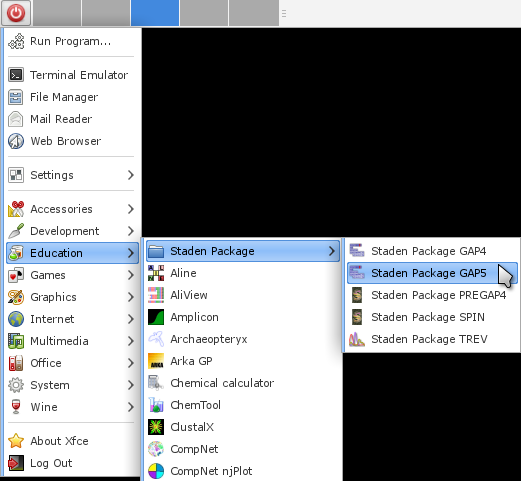
That’s it!


Interesting. Is it possible to put sub-menus within sub-menus within sub-menus, ad infinitum, like you could do with Windows 95?
No idea, to be honest…